


AW09PH Series AW10PH Series AW12PH Series AW14PH Series AW18PH Series AW24PH Series AW122PB

Register your product at www.samsung.com/global/register
The following safety precautions must be taken when using your air conditioner.
DURING OPERATION u Users of this product are cautioned not to attempt repair of this product at their own discretion. Instead, they are requested to directly contact a designated service center or the outlet at which the product was purchased.
u Never spill any kind of liquid into the unit. Should this happen, unplug or main switch off the unit and contact an authorized service center.
u Do not insert anything between the air outlet blades because the inner fan may be damaged and could cause injury. Keep children away from the unit.
u Do not place any obstacles in front of the unit.
u Do not spray liquid of any kind into the indoor unit. Should this happen, switch off the breaker used for your air conditioner and contact your installation specialist.
u Make sure that the unit is correctly ventilated at all times: Do not place clothing or other materials over it.
u If the wireless remote control will not be used for a long time, remove the batteries. (If applicable)
u When using a wireless remote control, the distance should not be more than 7 meters from the air conditioner. (If applicable)
u The air conditioner must be plugged into its own specific power source, which must be installed in compliance with national wiring,earthing and safety regulations.
u If the power cord is damaged in any way, it must be replaced by the manufacturer or its service agent or a similarly qualified person in order to avoid a hazard.
u This device must be installed according to the national electrical rules.
u The appliance must be installation that the plug should be easily accessible after installation.
u If the fuse on PC board is broken please change it with the type of T 3.15A 250V.
u The breaker of the air conditioner should be all-pole switch; and the distance between its two contacts should be no less than 3.5mm. Such means for disconnection must be incorporation in the fixed wiring.
DISPOSING OF THE UNIT u Before throwing out the device, it is necessary to pull back the battery cells and get rid of them safely for recycling reasons.
u When you need to dispose of the unit, consult your dealer. If pipes are removed incorrectly, refrigerant may blow out and come into contact with your skin,causing injury. Releasing refrigerant into the atmosphere also damages the environments.
u Please recycle or dispose of the packaging material for this product in an environmentally responsible manner.
OTHERS u Never store or ship the air conditioner upside down or sideways to avoid damage to the compressor.
u The appliance is not intended for use by young children or infirm persons without supervision: Young children should be supervised to ensure that they do not play with the appliance.
u Max current is measured according to IEC standard for safety and current is measured according to ISO standard for energy efficiency.


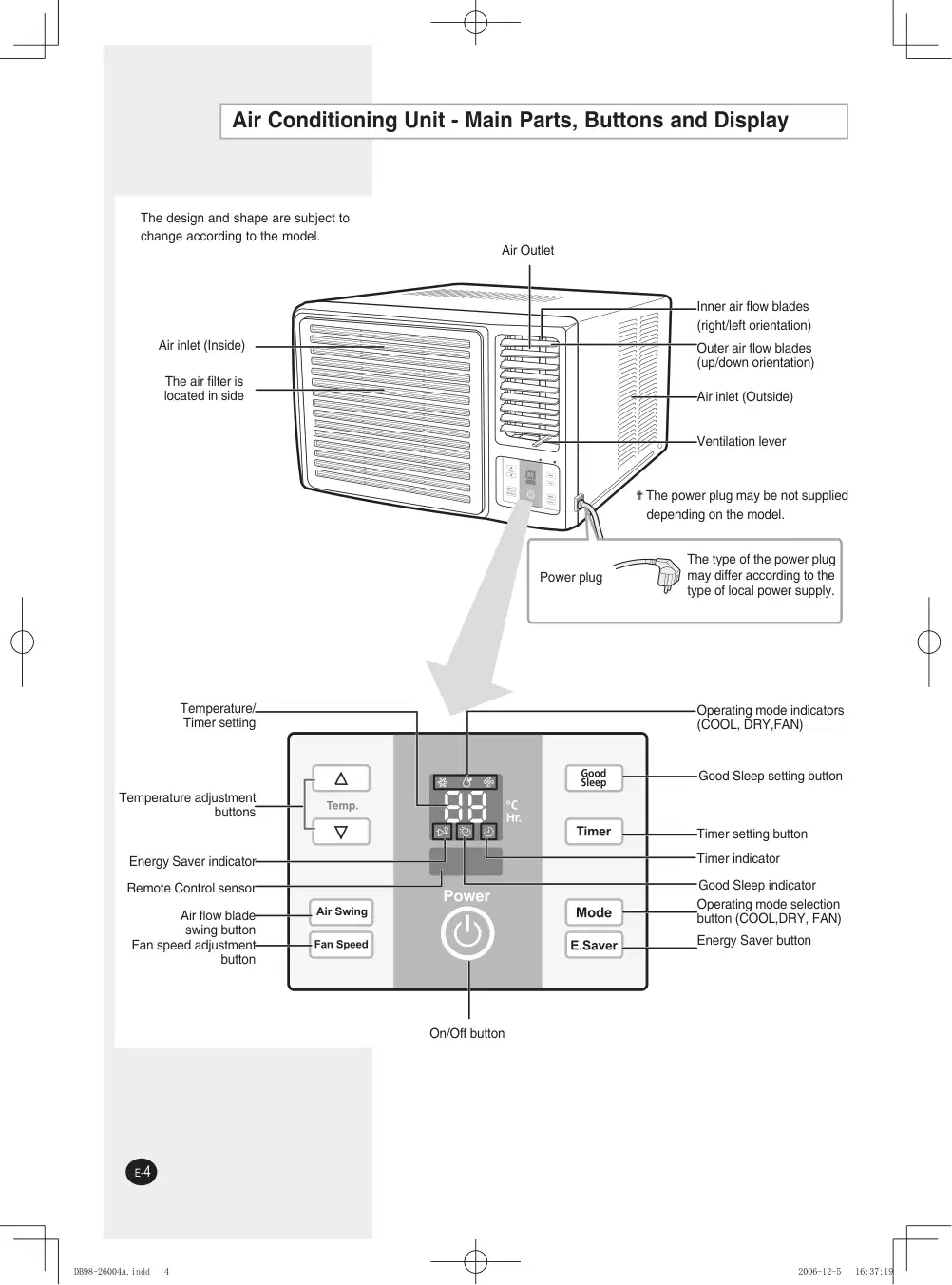
The design and shape are subject to change according to the model.
Ê✟The power plug may be not supplied depending on the model.
The type of the power plug may differ according to the type of local power supply.


You have just purchased a window-type room air conditioner and it has been installed by your
installation specialist.
Your Owenr’s Instructions contain valuable information on using your air conditioner.
Please take the time to read them as they will help you take full advantage of the unit’s functions.
This Owner’s Instructions is just for using your air conditioner correctly.
Thus, the illustrations shown in this manual may not exactly match your air conditioners.
The booklet is organized as follows.
- Air conditioning unit (main parts, buttons and display)
- Remote control (buttons)
They will help you find the buttons and understand the symbols displayed.
In the manual, you will find a series of step-by-step procedures for each function available.
PRESS PUSH IMPORTANT NOTE
Moreover,applicable, wherever the illustrations show the positions of the buttons on both the
remote control and the unit itself.
For the... The illustrations have a...
Unit itself White background. Example:

You purchase the air conditioner
The remote control does not work correctly
Use two AAA, LR03 1.5V batteries. Do not use old batteries or different kinds of batteries together.
Batteries may be completely discharged after 12 months, even if they have not actually been used.
1 Push the battery cover on the rear of the remote control with your thumb in the direction of the arrow and remove it.
2 Insert the two batteries,taking care to respect the polarities: + on the battery with + on the remote control - on the battery with - on the remote control
3 Close the cover by sliding it back unitl it clicks into place.
Result: You can control all the functions your air conditioning unit directly from your seat, using the remote control.


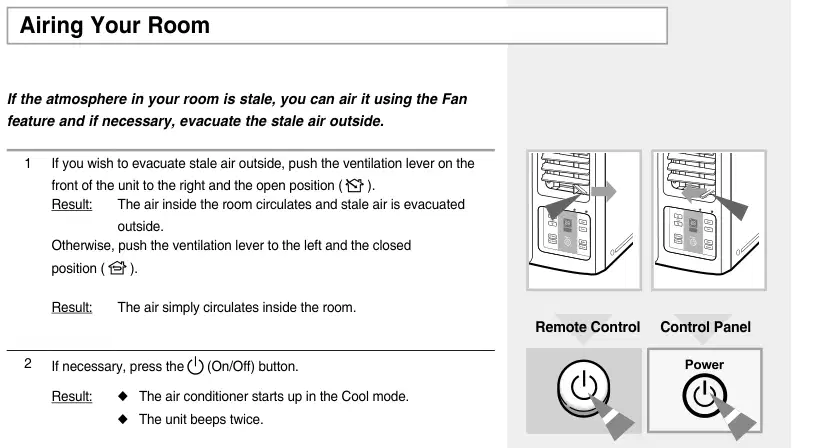
If the atmosphere in your room is stale, you can air it using the Fan
feature and if necessary, evacuate the stale air outside.
1 If you wish to evacuate stale air outside, push the ventilation lever on the
front of the unit to the right and the open position ( ). Result: The air inside the room circulates and stale air is evacuated
outside. Otherwise, push the ventilation lever to the left and the closed
Result: The air conditioner starts up in the Cool mode.
3 If the FAN indicator is not lit up on the unit:
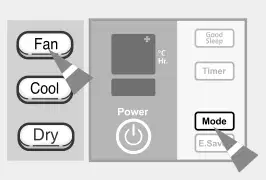
Press the button on the remote control
Press the button on the unit one or more times until the FAN
Result: The unit beeps each time you press the / button.
The air conditioner starts up in Fan mode.
You can change modes at any time.
When the air conditioner is in the Fan mode, the temperature is not dis
played; in this case, you do not need to set the temperature.
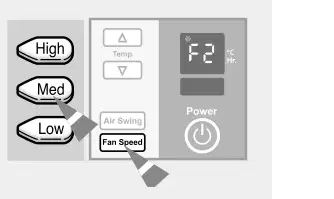
4 To set the fan speed to... Then...
Press the , or button on the remote control as desired.
Press the button on the unit one or more times until the
desired fen speed(F1, F2, or F3) is displayed.
: Low Speed
: Med Speed
: High speed
5 To control the direction of the air flow, refer to page 11.
or · indicator lights up · or


Depending on the position of the unit in your room, you can adjust the
orientation of the inner air flow blades on the right-hand side of the unit,
thus increasing the efficiency of the air conditioner.
1 Press the (or on the unit) button on the remote control.
Result: The inner blades swing automatically left and right.
2 To stop the blades moving left and right, press the (or on the unit) button in the remote control.
To stop the blades in a specific position and orient the air flow in the
corresponding direction, simply press the (or on the unit) button on the remote control when the blades are in the desired position.
Again depending on the position of the unit in your room, you can
side of the unit.
RECOMMENDATION When... Adjust the blades to face...
Cooling Upwards.
Adjust the air flow blades to the desired position, by pushing them upwards or downwards.
If you orient the air flow blades downwards and the unit operates in Cool mode
for a long period of time, dew may:
From on the surface of the blades
Drip from the blades


The Off Timer enables you to switch off the air conditioner automatically after a given period of time.You can set the period of time from 1 hour to 24 hours. You can select the Off Timer only when the air conditioner is on. Remote Control Control Panel
1 Check that the air conditioner has been switched on; if necessary,
press the (On/Off) button.
2 Set the operating time by pressing: on the remote control. or on the unit one or more times. Possible time is between 1 hour and 24 hours inclusive.
Result: The remaining time is displayed and decreased by 1 hour automatically to indicate the remaining time. The air conditioner switches off automatically when the operating time reaches zero.
You can change the fan speed and air flow direction and others
after setting the Off Timer.
To cancel the Off Timer, press:
on the remote control or on the unit one or more times until
" " is displayed.
(On/Off) button on the remote control or unit.
or


If you wish to save Energy when using your air conditioner, select the Energy Saving mode with the Energy Saver button.

1 To select the Energy Saving mode, press the Energy Saver button on the remote
control or unit one or more times until the Energy Saver indicator lights up.
Result: The fan and compressor cycle on and off together. The fan will continue to run for a short time after the compressor cycles off.
2 To stop the Energy Saving mode, press the Energy Saver button on the remote control or unit again.
Result: The fan runs at all times, while the compressor cycles on and off.
If you select the Good Sleep mode in the Energy Saving mode, the Energy Saving will be cancelled and the air conditioner will start up in the Good Sleep mode.
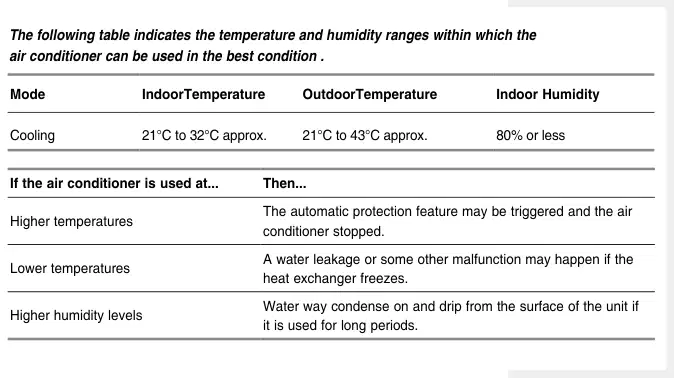
The following table indicates the temperature and humidity ranges within which the air conditioner can be used in the best condition .
Cooling 21°C to 32°C approx. 21°C to 43°C approx. 80% or less
Higher temperatures The automatic protection feature may be triggered and the air conditioner stopped.
Lower temperatures A water leakage or some other malfunction may happen if the heat exchanger freezes.
Higher humidity levels Water way condense on and drip from the surface of the unit if it is used for long periods.

Be sure to clean the air filter periodically to maintain the air conditioner in
the best condition for a long period of time.
When cleaning the air conditioner, turn it off and pull out
the power plug.
1 Hold the front grille handle, slightly pull it to the left side and open the front grille.
The removal of the front grille makes it easier to clean the air conditioner. Open the grille as much as possible.
Removal and Reassembly of the Front Grille
For user’s safety, a safety clip has been installed in the front grille.
1 Grasp the lower part of the front grille and the front grille handle, then open the grille. (The open angle of front grille has not to be exceeded 25 degree)
2 Lift the front grille slightly and remove it from the front panel.
3 Reassembling of front grille should be done in reverse order of disassembly.
2 Pull the air filter to the right side.
3 Remove all dust on the air filter with a vacuum cleaner or brush.
4 When you have finished, insert the air filter back into its original position.
5 Wipe the surface of the unit with a neutral detergent and then wipe it again with dry cloth. (Be sure not to use benzene, solvent or other chemical products.)
If you... Then...
The air conditioner has two or three grille grooves depending on the model.
Will not be using the air conditioner for a long period of time
Set the fan going for a few hours to dry the inside of the air conditioner thoroughly. Switch the air conditioner off and unplug it from the wall socket. Clean the filter and outer surfaces.
Have not used the air conditioner for a long period of time
Set the fan going for a few hours to dry the inside of the air conditioner thoroughly.

Before contacting the after-sales service,perform the following simple checks.
They may save you the time and expense of an unnecessary service call.
The air conditioner does not
Check that the circuit breaker used for the air conditioner has not
been triggered.
Check that the power cable is plugged into a wall socket and the
socket is switched on, if necessary.
Check that the operating mode indicator (COOL or FAN) on the unit is
lit up; if necessary press (On/Off) button on the remote control or
unit.
The air conditioner does not
Check that there are no obstacles between you and the unit.
operate with the remote control
Replace the remote control batteries if necessary.
Check that you are close enough to the unit (seven metres/yards
or less).
No beep is heard when you press
Check that you are pointing the remote control at the remote
(On/Off) on the remote control
control sensor on the unit.
Replace the remote control batteries if necessary.
The air conditioner does not cool Check that the correct operating mode has been selected COOL..
The room temperature may be too low.
Dust may be blocking the air filter; refer to page 16 for
cleaning instructions.
Check that there is no obstacle blocking the air flow into or out of
the unit.
The air flow direction does not
Check that the air conditioner has been switched on; if necessary,
change when you press the
press (On/Off) button on the remote control or unit.
or on the unit button
The timer is not correctly triggered Check that the timer has been programmed correctly;
see page 12~13.
Odour is permeated in the
Air the room.
room during air conditioning
Problem Explanation/Solution · operate at all

Frequecy Capacity Power Consumption
115V~, 60Hz 220V~, 60Hz 220V~, 60Hz 220V~, 60Hz
12000BTU/h 12000BTU/h 18000BTU/h 24000BTU/h
11,2A 5,5A 8,3A 12,5A
AW12PKAB 115V~, 60Hz 12000BTU/h 1110W 10,0A 220V~, 60Hz 12000BTU/h AW12PKBB 1110W 5,2A
Model Voltage & · Operating · Current

1 Electrical Requirements For personal safety: This appliance must be properly grounded. Do not, under any circumstances, cut or remove the third grounding prong from the power cord. We recommend that you do not use an extension cord or an adapter plug with this appliance. Do not change the plug on the power cord of this appliance. Follow national electrical codes or local codes and ordinances.
115V 15 AMP Circuit “parallel” type
230V/208V 20 AMP circuit “perpendicular” type
230V/208V 15AMP circuit “tandem” type
230V/208V 30 AMP circuit “tandem” type
If the electric supply provided does not meet the above specifications, call a licensed electrician. Aluminum house wiring may pose special problemsconsult a qualified electrician. This unit requires a separate circult, serving only this appliance.

Before installation, be sure to check the installation area or the air conditioner, and drain hose.
Checkpoints prior to installation
1 Check the cabinet and front grille of the unit for any harmful defects
such as scratches.
2 Be sure to check the power supply. - Refer to the specifications on the label attached to the unit.
1 As the unit is heavy, the wall or window of the installation area should have sufficient strength and durability for operation of the air conditioner, and for prevention of any vibration or noise. If it is weak, reinforcement work should be performed separately.
2 It is advisable to install the air conditioner in the north or west side to prevent the effect of direct sunlight. When installing it in the south or east side due to unavoidable circumstances, it is advisable to install the sunshade to prevent the direct sunlight. In this case, take care not to cause any hindrance to the flow of outside air.
3 When installing the air conditioner, be sure to obtain sufficient space on the rear side of the unit for smooth flow of air. When operating the air conditioner in closed areas such as inner building with cooling operation, and result in trouble with the unit. See the illustration below.
The appliance must be fixed well by screw or similar method.
75mm min. 300mm
Fence, wall or other obstacle
Approx.3
AW07/AW08/AW09 145 AW10/AW12 170 260
150mm min.
If the wall is greater than 150mm thick, cut the wall back on a 45 angle if possible.


MEXICO 01-800-SAMSUNG (7267864) www.samsung.com/mx ARGENTINE 0800-333-3733 www.samsung.com/ar
BRAZIL 0800-124-421 4004-0000 www.samsung.com/br
CHILE 800-726-7864(SAMSUNG) www.samsung.com/cl COSTA RICA 0-800-507-7267 www.samsung.com/latin ECUADOR 1-800-10-7267 www.samsung.com/latin EL SALVADOR 800-6225 www.samsung.com/latin GUATEMALA 1-800-299-0013 www.samsung.com/latin JAMAICA 1-800-234-7267 www.samsung.com/latin PANAMA 800-7267 www.samsung.com/latin PUERTO RICO 1-800-682-3180 www.samsung.com/latin REP. DOMINICA 1-800-751-2676 www.samsung.com/latin TRINIDAD &
TOBAGO 1-800-7267-864 www.samsung.com/latin
VENEZUELA 0-800-100-5303 www.samsung.com/latin COLOMBIA 01-8000112112 www.samsung.com.co AUSTRALIA 1300 362 603 www.samsung.com/au
INDIA 3030 8282 1800 110011 http://www.samsung.com/in/
INDONESIA 0800-112-8888 www.samsung.com/id MALAYSIA 1800-88-9999 www.samsung.com/my PHILIPPINES 1800-10-SAMSUNG (7267864) www.samsung.com/ph SINGAPORE 1800-SAMSUNG (7267864) www.samsung.com/sg
THAILAND 1800-29-3232 02-689-3232 www.samsung.com/th
VIETNAM 1 800 588 889 www.samsung.com/vn SOUTH AFRICA 0860 726 7864 (SAMSUNG) www.samsung.com/za 800SAMSUNG (7267864) 8000-4726 www.samsung.com/mea U.A.E
Owners and our team usually reply within a day — and your question helps the next person too.
Be the first to ask — other owners or our team will answer.